Common Problems in Sublimation Printing (and How to Fix Them)?

You followed all the instructions, but your final print looks dull, blurry, or splotchy. It’s incredibly frustrating to waste expensive blanks and feel like you're failing, especially with client orders on the line. Let's fix this.
Most sublimation problems boil down to three key variables: Time, Temperature, and Pressure. Other common culprits include moisture in your blank, a clogged printer nozzle, or using the wrong materials. Systematically checking these factors will solve almost any issue you encounter.

I remember one holiday season when I had a huge order for 500 corporate gift mugs. The first batch of 20 came out with a brownish, faded tint instead of the client's bright red logo. Panic set in immediately. I could see my profit margin vanishing into a pile of ruined mugs. Instead of freaking out, I stopped, took a deep breath, and went back to basics. I checked my press temperature, recalibrated my time, and realized my pressure was way too light. After a few adjustments and one more test mug, the red was perfect. That experience taught me that troubleshooting isn't magic; it's a methodical process. Let's go through that process together so you can solve these problems with confidence.
Why is my sublimation not working?
You’ve invested in the gear and followed the tutorials, but your prints are a disaster. Your colors are dull and your images are blurry. You're wasting materials and feeling completely defeated, wondering if you can ever make this work.
When sublimation fails, it’s almost always a mismatch in the "Big Three": Time, Temperature, or Pressure. Another hidden culprit is moisture. Even a tiny bit of humidity in your blank or paper can ruin a print by creating splotches or spots of discoloration.
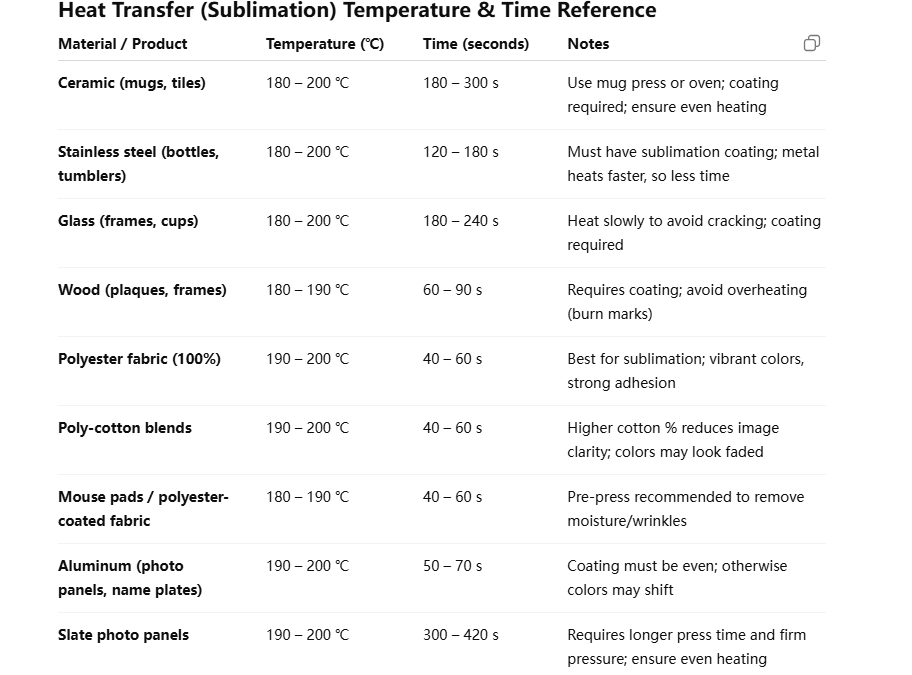
Dive Deeper: The Sublimation Troubleshooting Matrix
Think of yourself as a detective. Your failed print is a clue. You just need to know how to read it. I've wasted more blanks than I care to admit learning these lessons, so let this table be your shortcut. For a designer like Emma, who is focused on quality and deadlines, being able to quickly diagnose and fix an issue is a critical skill that saves both time and money. When a print goes wrong, don't guess. Come to this chart and find the most likely cause.
| Symptom | Most Likely Cause(s) | How to Fix It |
|---|---|---|
| Dull, Faded, or Light Colors | 1. Not enough pressure. 2. Not enough time or temperature. 3. You're printing on the wrong side of the paper. 4. You're using a cotton-blend, not 100% polyester. | 1. Increase pressure to firm. 2. Slightly increase time/temp (e.g., add 10 seconds or 5°F). 3. Ensure you print on the brighter, smoother side of the paper. 4. Check your garment tag! Sublimation needs polyester. |
| Blurry Image or "Ghosting" | 1. The sublimation paper shifted during or after pressing. 2. Too much pressure is forcing the ink to spread. | 1. Use high-temperature tape to secure your paper to the blank. 2. Open your press smoothly without sliding the item. 3. If it's a fabric item, let it cool for a few seconds before peeling. |
| Small Blue Dots or Splotches | Moisture! This is the number one hidden problem. The moisture turns to steam and pushes the ink away, leaving spots. | Pre-press everything! Before adding your transfer, press the blank shirt for 5-10 seconds to bake out any humidity. For hard goods like mugs, ensure they are dry and at room temperature. |
| Uneven or Inconsistent Print | 1. Uneven pressure from your heat press. 2. Your heat press has cold spots (uneven heating element). | 1. Check a "dollar bill test" on your press (try to pull bills out from the corners when closed) to ensure even pressure. 2. Consider rotating your item halfway through the press time. 3. This may indicate it's time to invest in a higher-quality heat press. |
How do I unclog an Epson sublimation printer?
Your nozzle check shows broken lines, or one color is completely missing from your prints. You've run a head cleaning cycle, but it did nothing. This is a nightmare, especially when you have orders to fulfill and your printer is out of commission.
First, run up to three standard head cleaning cycles from the printer's maintenance menu. If that fails, try a "power clean" or "deep clean" if available. For stubborn clogs, a manual cleaning method using a syringe and a specialized cleaning solution can work, but it carries risks.
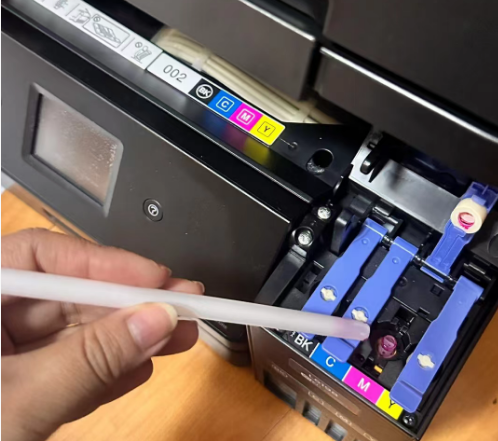
Dive Deeper: A Step-by-Step Guide to Rescuing Your Printhead
A clogged printer feels like a catastrophe, but it's often fixable. I've had printers I was sure were dead, only to bring them back to life with patience. The key is to start with the least aggressive method and only escalate if necessary. A designer like Emma can't afford printer downtime, so learning this process is essential.
Step 1: The Software Fix (Always start here)
- Nozzle Check: Print a nozzle check pattern first. This is your diagnostic map. It shows you exactly which colors are blocked.
- Head Cleaning: Run a standard head cleaning cycle. This uses a small pump inside the printer to force ink through the nozzles.
- Repeat: Print another nozzle check. If it's improved but not perfect, run a second head cleaning. Do not run more than three in a row, as this can fill up the internal waste ink tank and wear out the pump.
Step 2: Patience is a Virtue
- If a few cleanings don't work, sometimes the best thing to do is nothing. Let the printer sit for several hours or overnight. This can allow a stubborn air bubble or a small clog to dissolve and work its way out. I've had this simple trick save me more than once.
Step 3: The Manual Fix (Use with Caution)
- Disclaimer: This is an advanced technique. It can fix a bad clog, but if done incorrectly, it can damage your printhead. Proceed at your own risk.
- What you need: A syringe, a small piece of flexible tubing that fits over the ink nozzle C, and printhead cleaning solution specifically for sublimation ink.
- The Process: You gently push and pull a small amount of cleaning solution through the clogged nozzle to break down the dried ink. This requires removing the ink cartridges/tanks and accessing the printhead assembly. I highly recommend watching a detailed video tutorial for your specific printer model before attempting this.
How to improve sublimation printing?
Your prints are acceptable, but they don't have the "wow" factor. They're not as sharp or vibrant as the pros'. This gap in quality is frustrating and limits what you can charge for your work. You're ready to level up your game.
To dramatically improve sublimation quality, focus on three areas: use premium paper and ink, install a custom ICC profile for color accuracy, and ensure your heat press provides consistent, accurate temperature. These three pillars are the foundation of professional-grade results.
Dive Deeper: From Hobbyist to Professional Quality
When I decided to build my own brand, "good enough" wasn't going to cut it. I needed to produce items that looked truly premium. I spent countless hours testing different papers, inks, and settings. My big breakthrough came when I finally understood and correctly implemented ICC profiles. It was like switching from a standard definition TV to 4K. For a detail-oriented designer like Emma, mastering these elements is what will set her work apart and justify a higher price point.
Pillar 1: Upgrade Your Consumables
- Paper Matters: Not all sublimation paper is created equal. Cheap paper doesn't release ink as efficiently, leading to less vibrant prints and more ink being wasted. Invest in a well-regarded brand. A good paper provides sharper lines and richer colors.
- Ink Quality: The quality of the pigments in your sublimation ink directly impacts the final color vibrancy and longevity of the print. Stick with reputable ink suppliers who provide support and color profiles.
Pillar 2: Master Your Color with ICC Profiles
- What it is: An ICC profile is a small data file that tells your printer how to translate the colors on your screen into the specific colors of your sublimation ink. Without one, the printer is just guessing, which is why your prints might look too red or have a green tint.
- How to use it: Your ink supplier should provide an ICC profile for your printer and ink combination. You install it on your computer and apply it in your design software's print settings. This step alone is the single biggest leap you can make in quality.
Pillar 3: The Heart of the Operation - Your Press
- Accurate Temperature: Is your press really at 400°F? Many budget presses can be off by 20 degrees or more. Use an infrared temperature gun to check your platen and adjust your settings accordingly. Inaccurate temp is a primary cause of inconsistent results.
- Consistent Pressure: As mentioned before, uneven pressure creates uneven prints. A high-quality press provides edge-to-edge consistency, ensuring every part of your design transfers perfectly.
What is the problem with sublimation?
You love the amazing results of sublimation, but you keep hitting roadblocks. You can't print on cotton, you can't print on dark colors, and some items scorch under the heat. These limitations are frustrating and can make you feel restricted.
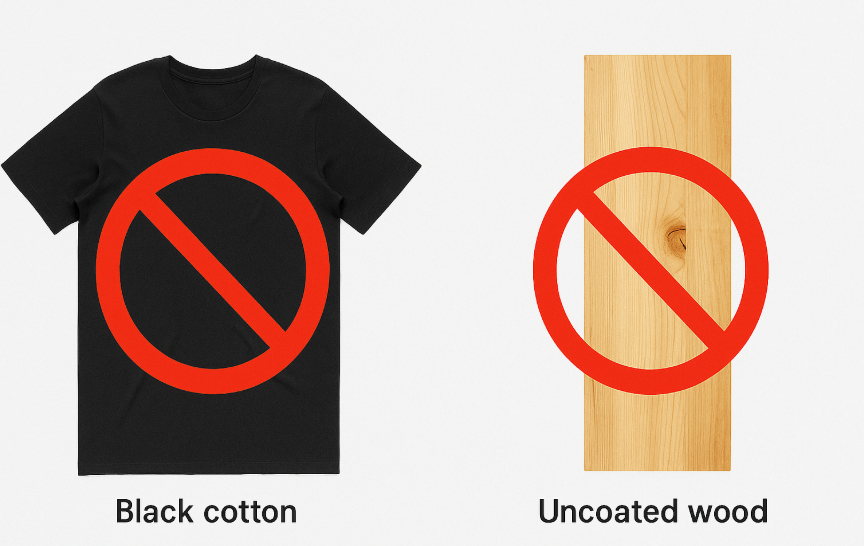
The biggest "problem" with sublimation is not a flaw, but its strict set of chemical requirements. It fundamentally only works with polyester fibers and specially coated hard surfaces. It also requires high heat (around 400°F/200°C), which can scorch or melt certain materials.
Dive Deeper: Working Within the Rules of Science
Instead of seeing these as "problems," I learned to see them as the "rules of the game." Knowing the rules inside and out is what makes you an expert. An architect doesn't complain about gravity; they design buildings that work with it. Similarly, a sublimation expert doesn't complain about the need for polyester; they choose the right products and techniques for the process. When a client asks for something outside the rules, I don't say "I can't." I explain why it won't work and then use my expertise to guide them to an alternative solution, like DTF printing, which builds trust and makes my business more valuable.
Here are the core limitations you must master:
- The Polyester Rule: Sublimation dye bonds chemically with polyester. It does not bond with natural fibers like cotton. This is why you must use 100% polyester apparel for full vibrancy or specially coated "sublimation blanks" for hard goods like mugs and tumblers. These blanks have a polyester polymer coating.
- The Light-Color Rule: Sublimation ink is transparent (think of it like a stain, not a paint). It cannot cover up the color of the surface underneath it. Printing on a black shirt is like using a transparent watercolor on black paper—it won't be visible. This is why sublimation works best on white or very light-colored materials.
- The High-Heat Rule: The sublimation process requires high temperatures (typically 385-400°F or 195-200°C). This means you can only sublimate on items that can withstand this heat without melting, deforming, or scorching. This is why you need special sublimation-ready blanks.
Conclusion
Troubleshooting sublimation is about methodically checking your time, temp, pressure, and moisture. Master these basics, maintain your printer, use quality supplies with ICC profiles, and understand the core rules of the process. This turns problems into solutions and turns you into an expert.

Hi there! I'm Lucy, the guardian angel of two good children. During the day, I am a professional in the heat transfer printing industry, from factory workshops to running my own business. Here I share what I have learned - let's grow together!