Why Do My Sublimation Colors Look So Dull?
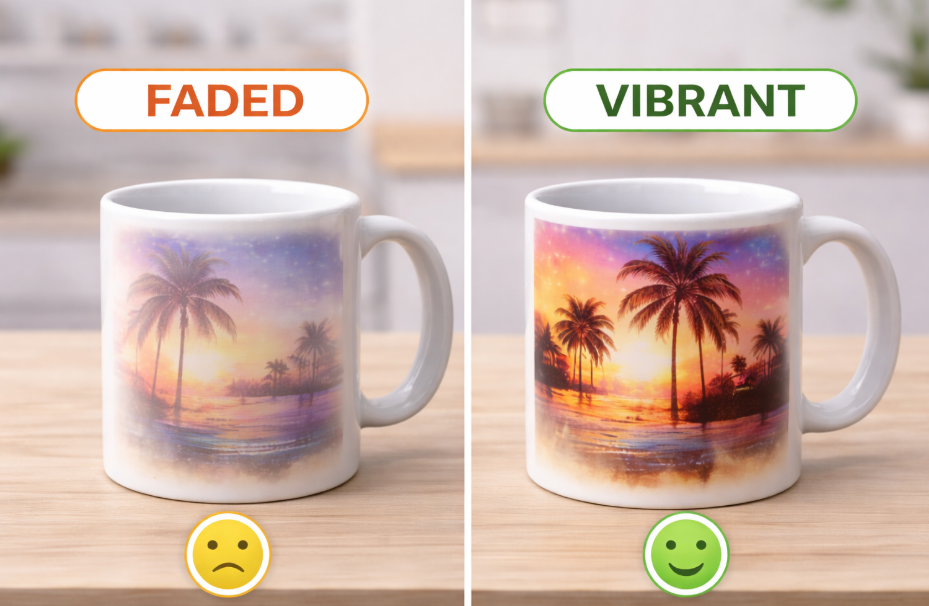
You spend hours perfecting a design on your screen, where the colors are rich and beautiful. But after you press it, the final product looks flat, muted, and lifeless.
This is beyond frustrating. It makes your work look unprofessional, wastes expensive materials, and shakes your confidence. You start to question if you'll ever get those vibrant results you see online.
Sublimation colors appear dull primarily due to incorrect color management, specifically the lack of a proper ICC profile. Other major causes include using low-quality materials like ink or paper, or incorrect heat press settings like not enough time or pressure.
I'll never forget the disappointment of my first big order for custom tumblers. On my computer, the client's logo was a beautiful, deep navy blue. But every single tumbler I pressed came out a weird, dull purple. I almost threw my printer out the window. It took me a while, but I learned that the problem wasn't my equipment—it was my process. Getting amazing color is a science, but it's a science anyone can master. Let's walk through the steps to get your colors to pop, every single time.
Why are my sublimation colors dull?
You've checked your heat press settings and they seem correct. But when you peel back the paper, the colors are weak and washed out, nothing like the vibrant image you started with.
This makes you feel like you are just throwing money away on ink and blanks. You can't figure out why your work doesn't have the "wow" factor, and it's holding your business back.
Your sublimation colors are dull because your printer is not communicating correctly with your ink and paper. This is almost always caused by not using an ICC profile, which acts as a translator, or by using cheap paper that doesn't release the ink properly.
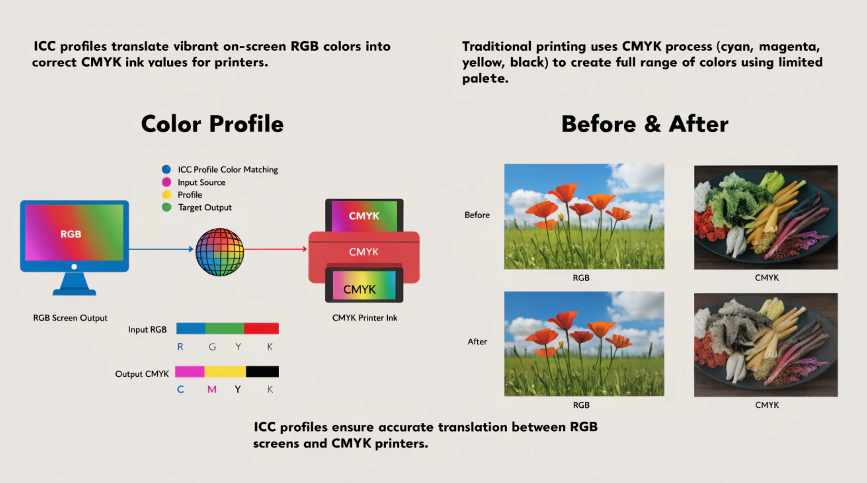
Dive Deeper: The Problem Starts Before the Press
If your print isn't faded from lack of heat, but the colors are just plain wrong, the issue is happening on your computer, not in your heat press. A designer like Emma, who relies on color accuracy, needs to master this digital workflow. It's the key to predictable results.
1. The ICC Profile is Non-Negotiable
Think of an ICC profile as a special translator. Your screen shows color using light (RGB), but your printer uses ink (CMYK). They speak different languages. An ICC profile is a specific file that tells the printer exactly how to mix its CMYK inks to perfectly match the RGB colors you see on screen. Without it, the printer is just guessing, which is why your navy blue turns purple or your bright red looks rusty. You must get the specific ICC profile from your ink manufacturer and use it correctly in your design software.
2. Your Paper is an Active Tool
Sublimation paper isn't just paper; it is a piece of technology. High-quality paper is designed with a special coating that holds the ink droplets precisely on the surface and then, under heat, releases almost 100% of that ink as a gas. Cheaper paper absorbs the ink into its fibers, trapping it. If the ink is trapped in the paper, it can never transfer to your product, resulting in a dull, weak image.
| Problem | Likely Cause | The Fix |
|---|---|---|
| All colors are muted | Low-quality paper | Switch to a reputable sublimation paper brand known for high ink release. |
| Specific colors are wrong | No ICC Profile Used | Install the ICC Profile for your specific ink and printer model. |
| Blacks look brown/green | Wrong Black Value/No Profile | Ensure you're using "Rich Black" (C:60 M:40 Y:40 K:100) and the ICC profile is active. |
How do I make my sublimation colors more vibrant?
Your prints are okay, but they just don't have that super-saturated, high-impact look that professional products have. You want your colors to really pop off the surface.
This gap in quality can stop you from charging premium prices. You know your work could be better, but you don't know the secrets to achieving that top-tier vibrancy.
To make sublimation colors more vibrant, you must use high-quality, high-saturation ink and premium paper. Then, fine-tune your process by slightly increasing your press time to force more ink to transfer, ensuring you have firm pressure for perfect contact.

Dive Deeper: Fine-Tuning for "Wow" Factor
Once you've got your basic process down with the right profiles and materials, making colors truly vibrant is about optimization. You want to push your system to its maximum potential without going too far and "overcooking" the print. This is how you get from "good enough" to "absolutely amazing."
When I was trying to perfect my tumblers, I created a standard and then started to experiment. It's a method I now teach everyone.
1. Optimize Your "Dwell Time"
The time and temperature recommendations from manufacturers are just starting points. The real magic happens when you find your perfect settings. Dwell time is simply the duration your product is in the heat press. By adding a little more time, you give the ink more energy to convert into a gas, which leads to deeper saturation in the final product. Try increasing your standard press time by 10% and see if the colors get richer. If they do, you're on the right track.
2. Leverage Your Print Settings
While the ICC profile should do most of the heavy lifting, your printer driver has tools you can use. In the print settings dialogue, look for options like "Vivid" or a "Saturation" slider. After selecting your ICC profile, you can try bumping the saturation up just a little. This tells the printer to lay down slightly more ink. A small change here can make a big difference in vibrancy, but be careful. Too much saturation can lead to ink bleeding, so test in small increments.
How can I prevent my sublimation prints from fading?
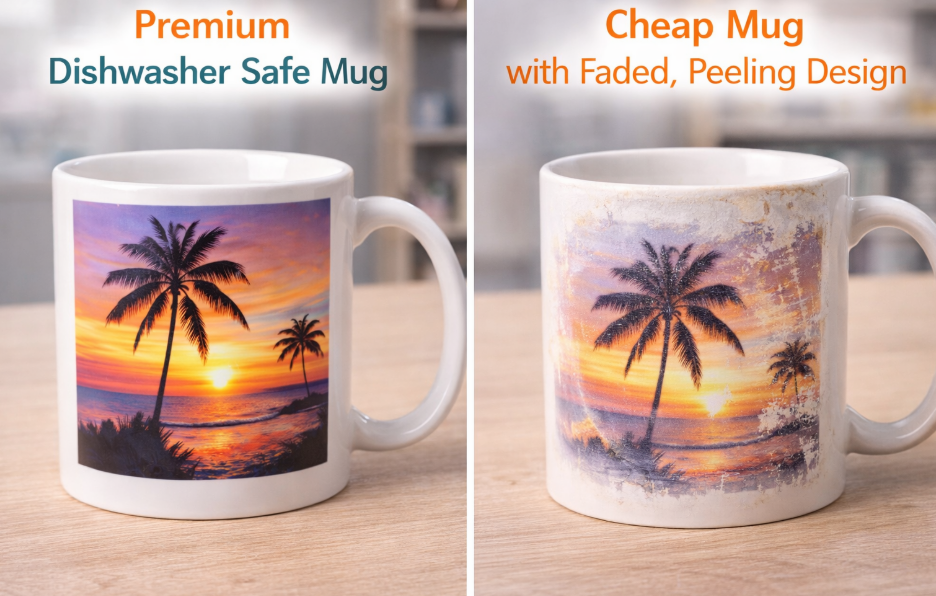
You sell a customer a beautiful, perfectly pressed mug. A few months later, they contact you with a photo showing the design has faded dramatically after a few runs through the dishwasher.
This is a business owner's nightmare. It destroys your reputation for quality, forces you to issue refunds, and can lead to damaging public reviews.
True sublimation prints do not fade. The process makes the ink a permanent part of the product. If a print is fading, the problem is not the ink—it's the product itself. Fading is caused by a low-quality polymer coating on the blank that is breaking down.
Dive Deeper: The Quality is in the Coating
I learned this lesson the hard way. Early on, I tried to save about 30 cents per mug by buying from a cheap, unknown supplier. It almost ruined my business. The prints looked great initially, but I soon got a wave of complaints about fading. I realized that the polymer coating is everything. The ink can only be as permanent as the surface it's bonded to.
1. What is a "Good" Coating?
When you look at a high-quality blank, the surface should be perfectly smooth, glossy, and uniform. There should be no bumps, divots, or dull spots. This indicates a thick, evenly applied polymer layer. Cheap blanks often have a very thin or inconsistent coating. When this weak coating breaks down from the heat of a dishwasher or UV from the sun, it releases the ink particles, and your image disappears.
2. "Dishwasher-Safe" is a Spectrum
A blank advertised as "dishwasher-safe" should have a certified hard coating designed to withstand high temperatures and harsh detergents. Premium suppliers will often provide certification data, like "tested for 3,000 wash cycles." Even with the best blanks, I always tell my customers to use the top rack of the dishwasher to be safe. But a truly high-quality mug should survive without any noticeable fading for years. Spending a little extra on a blank from a reputable supplier is the best insurance policy for your brand.
How can I make my colors more vibrant during the printing stage?
You print your design onto sublimation paper, and the colors look incredibly dull and washed out. The black looks brown, the red looks pink. You're immediately worried the print will fail.
This creates a ton of anxiety. You hesitate to press the item because you're convinced you've made a mistake and are about to waste a valuable blank.
This is completely normal! You should not worry. Sublimation ink is chemically designed to look dull and muted on the paper. The vibrant, true colors are only activated by the heat and pressure during the pressing stage. Always trust the process, not the paper.
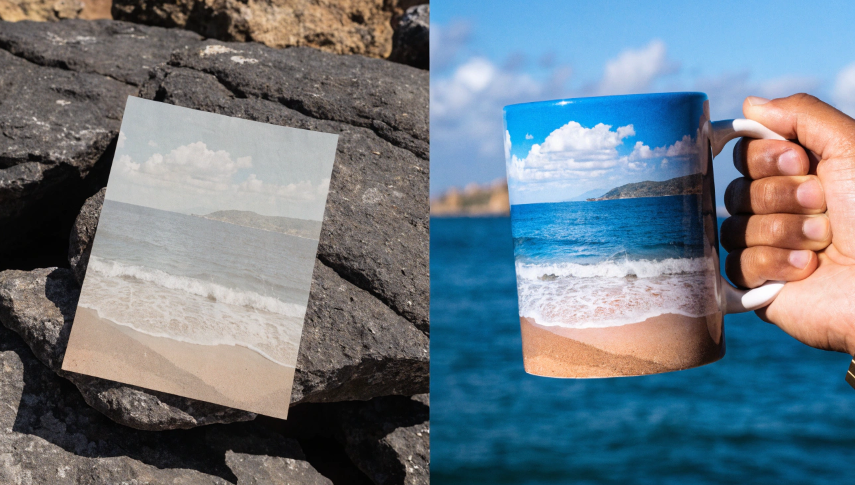
Dive Deeper: Trust the Chemical Reaction
What you see on the paper is not what you will get in the final product. This is one of the first and most important things every sublimator needs to learn. It feels wrong at first, but it's just basic science.
1. The "Sleeping" Ink
The ink you see on the paper is made of solid microscopic particles suspended in a liquid. In this solid state, they don't reflect light in a way that shows their true color. You can think of the ink as being "asleep" on the paper. It's waiting for the right conditions to wake up and show its brilliance.
2. Activation by Heat
When you apply heat and pressure in your press, a magical transformation happens. The heat gives the solid ink particles enough energy to skip the liquid phase entirely and turn directly into a gas (this is "sublimation"). This ink gas then flies from the paper and penetrates the surface of your polymer-coated product. As the item cools, the ink gas turns back into a solid, but now it is trapped inside the polymer. In this new, solid, trapped state, its true, vibrant colors are revealed and permanently locked in. So, a brownish ink on paper will become a deep, rich black on your final product. Trust the science!
Conclusion
Dull sublimation colors are a fixable problem. The solution lies in a disciplined process: use high-quality materials, install the correct ICC profile, and optimize your pressing technique. Master these elements for vibrant results.

Hi there! I'm Lucy, the guardian angel of two good children. During the day, I am a professional in the heat transfer printing industry, from factory workshops to running my own business. Here I share what I have learned - let's grow together!